read the transcript
- client notes in a public chatbot? not without a baa.
- no signed baa for your exact plan? assume you don't have one.
- turning off history doesn't create a baa
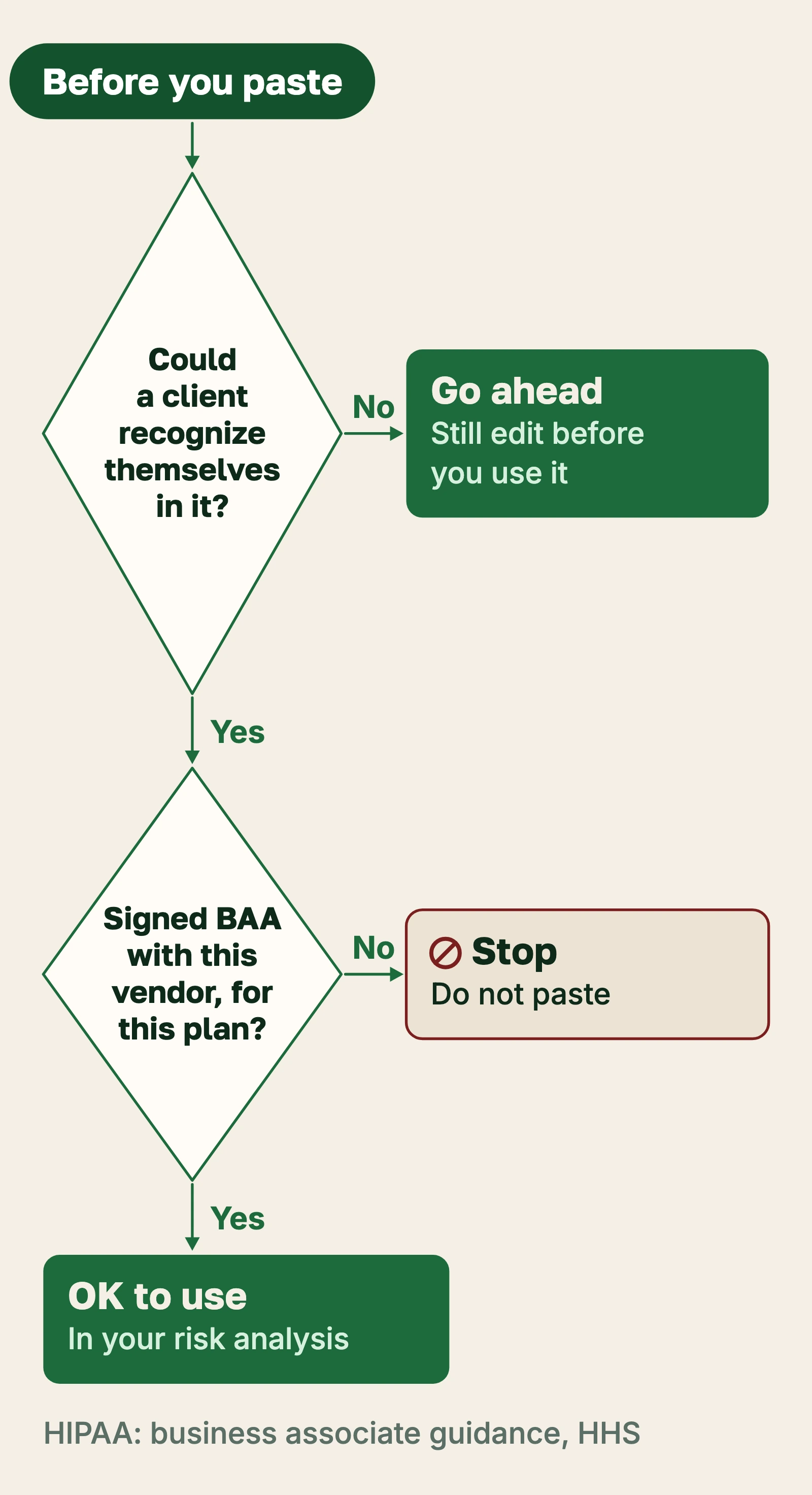
- if the client could recognize themselves, it stays out
- baa. sign it before any ai tool sees client information.
- the full lesson, link typed
- business education, not legal or billing advice.
You may already use an AI chatbot for something: a policy draft, an email that keeps coming out stiff, a summary of a long article. The real question is which tools may ever see client information, and what has to be in place before one does. This lesson covers when an AI vendor becomes your HIPAA business associate, why the signed agreement comes before the first upload, what pasting a note into a public chatbot actually amounts to, and a setup you can finish in an afternoon. The HIPAA basics lesson covers business associate agreements in general; here I stay with the AI choices.
When an AI vendor becomes a business associate
HHS defines a business associate as a person or company that creates, receives, maintains, or transmits protected health information (PHI) on behalf of a covered entity. The test is what the vendor does with the information, not what kind of software it sells. HHS's business associate guidance lists, among its examples, a third-party chatbot on a provider's patient portal that handles PHI (HHS calls it a "super intelligence (SI) chatbot"), and transcription vendors have long been on the list. An AI scribe, a note-drafting tool, or an assistant built into your scheduling system sits in the same place the moment client information flows through it.
The BAA comes first, even if the data is encrypted
The closest official rulebook for AI services is HHS's guidance on HIPAA and cloud computing. A cloud provider that creates, receives, maintains, or transmits electronic PHI for you is a business associate, and HHS says that holds even when the provider stores only encrypted data and has no key to read it. You need a HIPAA-compliant business associate agreement (BAA) before the vendor stores or processes anything. An AI service that takes your text, runs it on its servers, and keeps logs is doing exactly that.
HHS also publishes sample business associate agreement provisions, dated January 25, 2013, after the Omnibus Rule. A vendor's BAA will not match that sample word for word, but it should cover the same ground: what the vendor may do with the information, the safeguards it keeps, how it reports a breach to you, how it binds its own subcontractors, and what happens to the data when the contract ends.
Public chatbots and the paste problem
If you have not signed a BAA with a vendor, for the exact plan or account you are using, assume you do not have one. Without it there is no business associate relationship you can rely on, so typing a client's name, a session summary, or an intake answer into that tool is likely an impermissible disclosure of PHI. Turning off chat history or opting out of model training may change what the vendor keeps. It does not create a BAA.
That matters because of how HIPAA treats a disclosure after the fact. Under the Breach Notification Rule, an impermissible use or disclosure of PHI is presumed to be a breach unless you can show, through a documented risk assessment, a low probability that the information was compromised. One careless paste can turn into a risk assessment, a letter to the client, and a report to HHS.
What counts as client information in a prompt
Deleting the name is not enough. HHS's de-identification guidance describes a Safe Harbor method: remove 18 kinds of identifiers, including names, places smaller than a state, every part of a date tied to the person except the year, phone numbers, email addresses, record numbers, and full-face photos, and then have no actual knowledge that what remains could identify someone. That last condition is the one small practices trip on. "A middle-school vice principal in a town of 900 whose divorce made the local paper last month" names no one and still points to one person.
My working rule is stricter and easier to remember than Safe Harbor: if the client could recognize themselves in the prompt, it does not go into a tool without a BAA.
How to set up AI tools in your practice
- List every AI tool you already use. Include the chatbot on your phone, the writing helper in your email, any feature your EHR or video platform added with an "AI" label, and transcription inside your telehealth app.
- Sort each tool into two columns. One for tools that never see client information, one for tools that might.
- Ask every vendor in the second column for a BAA in writing. Ask which plan or account type the BAA covers, and confirm yours is that one. Hold it up against the HHS sample provisions and look for breach reporting, subcontractors, and return or destruction of data.
- No BAA, no client information. If the vendor will not sign, move the tool to the first column and use it only for work with no client details, or drop it.
- Check the settings that come with the BAA. A signed agreement can still leave choices to you: whether prompts are stored, for how long, and whether they may be used to train models. Pick the most protective option you can work with and write down what you chose.
- Add each tool to your risk analysis. Name the tool, the PHI it touches, and your safeguards. The cloud guidance expects you to understand the vendor's environment well enough to do this.
- Write a one-page acceptable-use list. Which tools are approved for PHI, which are approved only for work with no client details, and the "could they recognize themselves" test. Give it to anyone who works for you, including a contract biller.
- Recheck once a year and whenever a tool changes. Vendors add AI features to software you already pay for, and a new feature can change where your data goes.
If you already pasted something
Do not just delete the chat and move on. Write down what went in, when, and to which tool and plan. Delete the conversation if the tool allows it and read the vendor's retention terms. Then work through the risk assessment the Breach Notification Rule describes, which weighs four factors: the nature and extent of the information, who received it, whether it was actually acquired or viewed, and how far the risk has been mitigated. Keep that record. If you cannot show a low probability of compromise, notice to the client is due without unreasonable delay and no later than 60 days after you discover the breach. That is the week to call a HIPAA attorney, not the week after the deadline.
None of this is legal advice. I summarized what HHS's own pages say and linked each one; an attorney who knows HIPAA gets the final word on your setup.
Further reading
- HHS: Business associates. The definition and the list of examples, including the patient-portal chatbot.
- HHS: Guidance on HIPAA and cloud computing. The encrypted-data point and what a BAA with a cloud vendor should address.
- HHS: Sample business associate agreement provisions. The 2013 template to compare a vendor's contract against.
- HHS: Guidance on de-identification of PHI. The full Safe Harbor list and the expert determination method.
- HHS: Breach Notification Rule. The presumption of breach, the four factors, and the notice timelines.
- AI scribes and note tools. The next lesson in this topic: choosing a scribe and keeping the record yours.
Sources
- “Business Associates.” U.S. Department of Health and Human Services, Office for Civil Rights. Definition of business associate; examples include a third-party chatbot on a patient portal and transcription vendors. HHS blocks automated fetches; confirmed by search. https://www.hhs.gov/hipaa/for-professionals/privacy/guidance/business-associates/index.html (accessed Nov 16, 2026).
- “Guidance on HIPAA & Cloud Computing.” U.S. Department of Health and Human Services, Office for Civil Rights, Oct 7, 2016. A cloud provider holding only encrypted ePHI without the key is still a business associate and needs a BAA. https://www.hhs.gov/hipaa/for-professionals/special-topics/cloud-computing/index.html (accessed Nov 16, 2026).
- “Sample Business Associate Agreement Provisions.” U.S. Department of Health and Human Services, Office for Civil Rights, Jan 25, 2013. https://www.hhs.gov/hipaa/for-professionals/covered-entities/sample-business-associate-agreement-provisions/index.html (accessed Nov 16, 2026).
- “Guidance Regarding Methods for De-identification of Protected Health Information.” U.S. Department of Health and Human Services, Office for Civil Rights. Safe Harbor: 18 identifiers removed plus no actual knowledge that the rest could identify the person (45 CFR 164.514(b)). https://www.hhs.gov/hipaa/for-professionals/special-topics/de-identification/index.html (accessed Nov 16, 2026).
- “Breach Notification Rule.” U.S. Department of Health and Human Services, Office for Civil Rights. Impermissible use or disclosure presumed a breach unless a four-factor risk assessment shows low probability of compromise; individual notice no later than 60 days after discovery (45 CFR 164.402, 164.404). https://www.hhs.gov/hipaa/for-professionals/breach-notification/index.html (accessed Nov 16, 2026).
Study guide
When an AI vendor is a business associate
- A business associate creates, receives, maintains, or transmits PHI on your behalf; the test is what it does with PHI, not what it sells
- HHS examples include a third-party chatbot on a patient portal and transcription vendors; AI scribes and note tools sit in the same place
The BAA comes first
- HHS cloud guidance: a vendor holding only encrypted ePHI without the key is still a business associate
- Sign the BAA before the vendor stores or processes anything
- Compare the vendor's BAA with the HHS sample provisions (January 25, 2013): permitted uses, safeguards, breach reporting, subcontractors, return or destruction of data
Public chatbots
- No signed BAA for your exact plan: assume you have none
- Pasting client information there is likely an impermissible disclosure
- Turning off history or training does not create a BAA
- An impermissible disclosure is presumed a breach unless a documented risk assessment shows a low probability of compromise
What counts as client information
- Safe Harbor removes 18 identifiers (names, places smaller than a state, date parts except year, phone, email, record numbers, full-face photos, and more) and requires no actual knowledge the rest could identify someone
- Working rule: if the client could recognize themselves, it stays out of any tool without a BAA
Setup steps
- List every AI tool, including features inside software you already pay for
- Sort: never sees PHI, or might
- Get a BAA in writing for every tool that might, for your plan
- No BAA, no client information
- Set storage and training options; write down your choices
- Add each tool to your risk analysis
- Write a one-page acceptable-use list for anyone who works for you
- Recheck yearly and when a tool changes
If you already pasted something
- Record what, when, which tool and plan; delete the chat if possible
- Run the four-factor risk assessment: nature of the information, who got it, whether it was acquired or viewed, mitigation
- Notice to the client, if required, no later than 60 days after discovery; call a HIPAA attorney
Key terms
- PHI: protected health information
- BAA: business associate agreement
- Safe Harbor: HIPAA's checklist method of de-identification
Official pages
Check what you learned
10 questions from this lesson. Answers are checked as you go; nothing is recorded.
1 / 10
What makes an AI vendor a HIPAA business associate of your practice?
Hint
Look at HHS's definition near the top of the lesson.
HHS defines a business associate by what it does with PHI for you: creates, receives, maintains, or transmits it. The label on the product does not decide it.
2 / 10
Which example does HHS's business associate guidance list that bears directly on AI tools?
Hint
See "When an AI vendor becomes a business associate."
HHS lists a third-party chatbot on a provider's patient portal among its business associate examples, alongside long-standing ones such as transcription vendors.
3 / 10
A cloud AI service stores only encrypted client data and has no key to read it. Under HHS's cloud guidance, do you still need a BAA?
Hint
HHS's guidance on HIPAA and cloud computing.
HHS says a cloud provider that maintains or processes ePHI is a business associate even when it holds only encrypted data without the key, so a BAA is required.
4 / 10
When should the BAA be signed?
Hint
The heading of the second section says it.
The BAA comes first: it has to be in place before the vendor stores or processes PHI.
5 / 10
You turn off chat history and model training in a chatbot you have no BAA with. Can you now paste a session summary into it?
Hint
See "Public chatbots and the paste problem."
Privacy settings may change what the vendor keeps, but they do not create a business associate relationship. Without a BAA, client information stays out.
6 / 10
Under the Breach Notification Rule, how is an impermissible disclosure of PHI treated?
Hint
The presumption is described in two places in the lesson.
HHS presumes an impermissible use or disclosure is a breach unless a documented risk assessment shows a low probability the information was compromised.
7 / 10
How many kinds of identifiers does HIPAA's Safe Harbor de-identification method remove?
Hint
See "What counts as client information in a prompt."
Safe Harbor removes 18 kinds of identifiers and also requires no actual knowledge that the remaining information could identify the person.
8 / 10
A prompt names no one but describes a vice principal in a town of 900 whose divorce made the local paper. Why is it still a problem?
Hint
Think about the "no actual knowledge" condition.
Safe Harbor also requires that you have no actual knowledge the rest could identify someone. Those details point to one person, so it fails.
9 / 10
What is the lesson's simple test for whether a prompt can go into a tool without a BAA?
Hint
The author's "working rule."
If the client could recognize themselves in the prompt, it does not go into a tool without a BAA.
10 / 10
If a breach notice to a client is required, what is the outer deadline after you discover the breach?
Hint
See "If you already pasted something."
Notice is due without unreasonable delay and no later than 60 days after discovery.
Worth another look


