Quiz
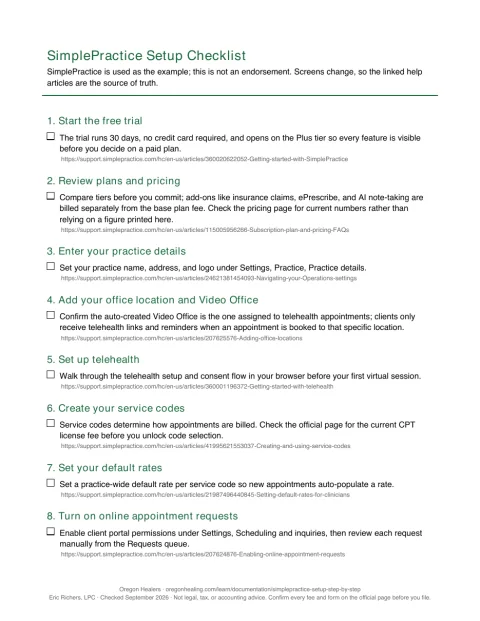
Setting up SimplePractice step by step
Check what you learned
10 questions from this lesson. Answers are checked as you go; nothing is recorded.
1 / 10
What is the first step in the setup sequence for SimplePractice?
Hint
The lesson lists the setup order at the beginning.
The lesson states the first step is to start the free trial.
2 / 10
Which tier does the free trial open on, allowing you to see every feature?
Hint
The trial runs 30 days with no card and opens on a specific tier.
The trial opens on the Plus tier so you see every feature before choosing a paid plan.
3 / 10
Where do you add a new office location in SimplePractice?
Hint
The lesson describes the path for adding office locations.
You add a location via Settings, Practice, Practice details, then Add a location.
4 / 10
What must be assigned to the Video Office for telehealth appointments?
Hint
Telehealth appointments need a specific assignment for links and reminders.
Telehealth appointments must be assigned to the Video Office to send video links and reminders.
5 / 10
Which feature must be enabled before you can build your availability?
Hint
The lesson says to turn on this feature before setting availability.
You must turn on appointment requests before setting up availability.
6 / 10
What is the limit of note templates for Starter accounts?
Hint
The lesson mentions template limits for Starter accounts.
Starter accounts are limited to the Simple Progress Note or SOAP and DAP templates.
7 / 10
When does AutoPay charge a client’s stored default card?
Hint
The AutoPay article describes the timing of the charge.
AutoPay charges the stored card between midnight and 6 am practice time after an invoice is created.
8 / 10
What does an enrollment with a payer allow you to do?
Hint
The lesson clarifies the purpose of enrollments.
An enrollment tells a payer you intend to send electronic claims or receive electronic payment reports.
9 / 10
Which sync tier provides two‑way Google sync and shows personal events inside SimplePractice?
Hint
The lesson compares basic and advanced sync tiers.
Advanced sync is Google‑only, two‑way, and shows personal events inside SimplePractice, and is Plus only.
10 / 10
How long must Oregon records be retained according to the lesson?
Hint
The lesson mentions Oregon’s record retention rule.
Oregon’s record retention rule runs seven years from the date of last service.
Worth another look
After the quiz
Documentation · EMR & EHR · Lesson 1 of 3
Setting up SimplePractice step by step
Sixteen numbered steps to set up SimplePractice for a solo practice, each linked to its help article, with plan prices as listed in September 2026 and the costs that sit on top of the plan.